

The Buffalo State Safety App is designed to keep our community informed and connected. Download it for free for iPhone or Android and activate with your unique code; contact UPD at police@buffalostate.edu for help if needed.


Safety App Features
- Direct access to University Police
- Campus safety resources
- Emergency information
- Tools to keep our community informed and connected
- Real-time emergency alerts
- Campus safety information and resources
Safety App Instructions
Powered by Omnilert, the same platform used for Buff State Alert emergency notifications, the free app is available for download for Apple App Store and Google Play. You can activate the app only with your unique code; access codes will be emailed out to campus September 23, 2026. Contact UPD at police@buffalostate.edu for assistance or if you do not receive your code.
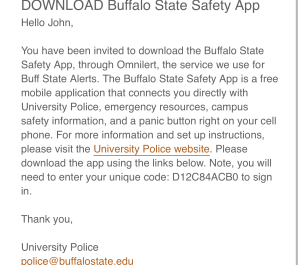
Sample Access Code Email
You will receive an email featuring your unique access code inviting you to download the Buffalo State Safety App. You may reach out to University Police at police@buffalostate.edu with questions, or if you do not receive a code.
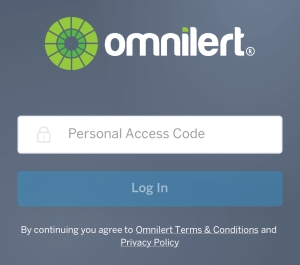
Omnilert's Personal Access Code Screen
After you have downloaded the app from the Apple App Store or Google Play, you will be able to proceed with logging in to the app by entering the personal access code you received via email.
Several factors shaped the decision to remove the blue light phone system:
Minimal usage: From 1998 to 2024, blue light phones were activated 1,082 times. Almost every call was due to a malfunctioning phone or people playing with the system.
Aging infrastructure: The system relied on outdated technology with increasing failure rates and limited replacement parts. 65% of the existing blue light phones were inoperable.
Increasing maintenance costs: Ongoing repairs are more costly and less sustainable.
Enhanced safety technology: The campus has invested in nearly 800 cameras throughout campus, access control systems, license plate readers, and gun detection devices.
Modern safety tools: The availability of mobile solutions such as the Buffalo State Safety app provide faster, more flexible access to emergency services, including text features and direct communication with UPD dispatch.
The way campus community members access emergency services has changed significantly since the blue light phones were first installed in the 1990s. Widespread cellular device use, combined with advances in safety technology, provides opportunities to offer more integrated tools that support communication, awareness, and emergency response.
Best practices: SUNY Oswego removed their blue light phones and went to a safety app in 2013. Many schools across the country have upgraded their technology and eliminated their blue light systems, from the University of Georgia to Colorado University, and many campuses use the same company, Omnilert, to power their safety apps.
Rather than replacing the blue light phones with another single system, Buffalo State has invested in a broader range of safety technology and resources.
These efforts include expanded surveillance camera coverage across campus, license plate readers to support investigations, the Buffalo State Safety App, and other technologies designed to strengthen emergency preparedness and response.
The new Buffalo State Safety App provides direct access to University Police through the Panic Button feature, emergency information, alerts, and campus safety resources.
The Buffalo State Safety App is an additional way to access University Police and campus safety resources, but it is not the only way to get help.
University Police remains available 24 hours a day, seven days a week. Anyone on campus can continue to contact University Police directly at (716) 878-6333 at any time, day or night, or visit University Police in person at Karner Hall.
If you don't have a cell phone or can’t access yours in an emergency, seek assistance from nearby staff, students, or other community members who can contact University Police on your behalf, or make your way to Karner Hall.
Emergency Management: Buffalo State is participating in the SUNY Emergency Management pilot program and will incorporate the Standard Response Protocol to streamline emergency responses and notifications. Look for more information on this over winter break and throughout the Spring semester.
Future safety investments: UPD and campus partners continually assess locations for strategic placement of cameras, access control, gun detection, lighting, and other measures to improve campus safety.
We remain committed to providing a safe campus environment and will continue evaluating.
It takes all of us to create the safest environment possible to learn, live, and work. Here are some essential tips:
Be aware of your surroundings and report suspicious behavior to UPD at 716-878-6333 or 911 if off campus.
Make sure your cell phone is charged and don’t travel alone when possible.
Use the campus shuttle for trips around campus and to/from Wegmans and Tops.
Download the Buffalo State Safety app. Check your email for your unique code. Use the app to get emergency messages, call UPD, silently alert UPD to a situation (panic button), and review different resources, including the campus map, mental health, UPD, and Title IX services.
Contact UPD Directly
Call (716) 878-6333